Liberty Analytics can be configured to update key fields from Active Directory for simplified management.
The synchronisation is dependent upon the correct user-attributes being set against user accounts in Active Directory.
To successfully synchronise Liberty Analytics Extension records with Active Directory, three standard Active Directory fields (ipPhone, Home Phone & Pager) need to be populated.
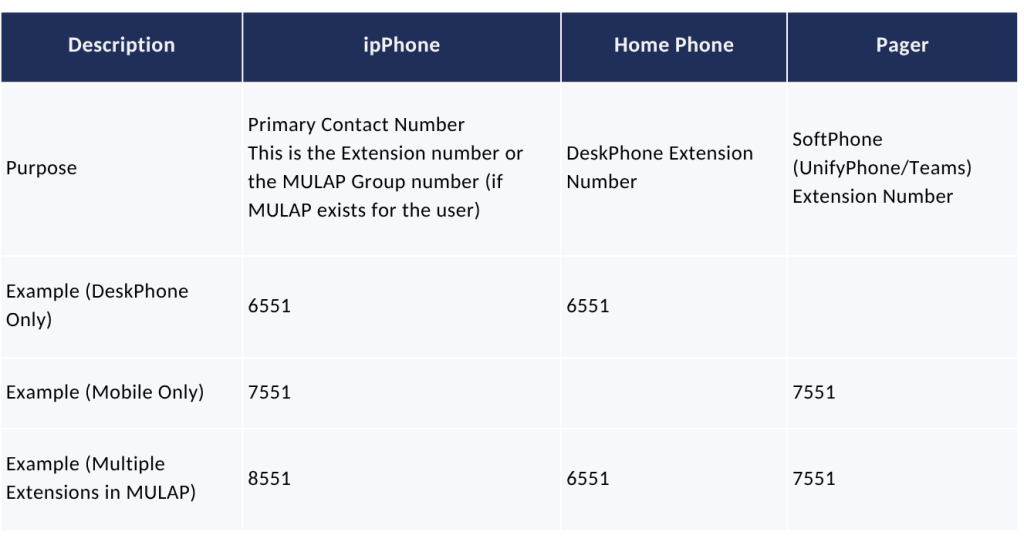
It is imperative that these AD user-attributes are populated accurately. Incorrect entries will invalidate stats in Reporting, Wallboards and Dashboards.
You should create one Active Directory Security Group for Liberty Analytics members. The default name for the Group is ‘LibertyAnalytics’.
Once AD and Liberty Analytics synchronisation is enabled, data records in Liberty Analytics will conform to Active Directory as follows:
Notwithstanding AD Synchronisation, records will be added to Liberty Analytics automatically, at the start of each business day, for any new extensions that have been added to the PBX. The Name, Branch & Department associated with these records will be unassigned.
Notes
The combination of Automatic Record Population and AD Sync automates some root-level configuration routines and makes basic tasks (eg name changes), seamless one-time updates via Active Directory. Nevertheless, Liberty Analytics provides stats from parameters not available in Active Directory or the PBX and, consequently, manual administration of Liberty Analytics will always be required.